Best Wireless Charging Kitchen Counter Solutions for Clutter-Free Power
Looking for the most convenient way to keep devices powered while working on the kitchen counter? This guide highlights five wireless charging options that fit neatly on a counter or under a cabinet, helping you reduce cords and clutter. Each pick targets a specific use case, from wall-outlet charging with magnetic alignment to pop-up outlets that hide in plain sight. Ideal buyers include: busy cooks wanting hands-free charging, homeowners seeking minimal desk clutter, and renters who need portable, space-saving options. Below is a quick comparison table of the featured products to help you decide at a glance.
| Product | Best For | Key Benefit |
|---|---|---|
| Wall Outlet Wireless Charger (Chargewell) | Everyday kitchen counters | Flush charging with built-in USB-C port |
| EZVALO Under-Cabinet Lighting with Charging Station | Low-light prep areas | Integrated lighting and wireless charging |
| Pop Up Outlet with 15W Wireless (VILONG) | Clean surfaces & power-hungry devices | Hidden pop-up design with multiple ports |
| EZVALO Under Cabinet Lighting with Charging Station (5-Pack) | Multiple work zones | Motion-sensing lights plus USB-C dock |
| Pop Up Outlet with 15W Wireless + PD 20W (VILONG) | High-power devices & compact desks | 9-in-1 with wireless charging |
Wall Outlet Wireless Charger — Chargewell

Best for: individuals who want a clean surface with no visible charging pad on counters and nightstands. This charger plugs directly into a standard wall outlet, keeping the surface free of cords. It provides official Qi2 15W fast charging and magnetically aligns with MagSafe-compatible devices, ensuring reliable alignment every time. A built-in USB-C port lets you charge a second device from the same outlet, which is ideal for a second phone or AirPods. Caution: position it where magnets won’t interfere with nearby metal objects or sensitive electronics.
EZVALO Under Cabinet Lighting with Charging Station
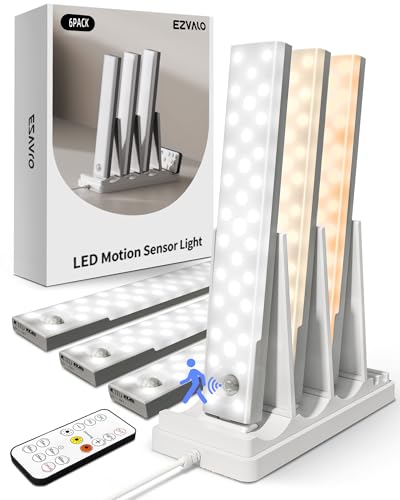
Best for: kitchens needing extra task lighting with charging capability. This unit combines adjustable motion-activated lighting (three modes) with a 2000mAh rechargeable battery and a 3-slot USB-C dock. It supports warm, natural, and cool white temps for different prep tasks and offers stepless dimming. The motion sensor enhances safety in dim conditions. Caution: battery life varies by mode; always consider the Always-On option if you frequently need continuous light.
Pop Up Outlet for Countertop with 15W Wireless Charging — VILONG (White)

Best for: compact workstations requiring a hidden, multi-function surface. This 2.5-inch-cutout pop-up outlet includes 4 USB ports, 4 AC outlets, and a 15W wireless charging pad, plus a PD 65W USB-C port for high-power devices. It’s ideal for kitchen islands or desks where surface clutter must be minimized. Caution: ensure countertop material supports the pop-up mechanism and that the installation area has adequate clearance for full extension.
EZVALO 5-Pack Under Cabinet Lighting with Charging Station

Best for: multiple prep zones in larger kitchens or offices. This kit provides 2400mAh lights with a 3-slot USB-C dock, supporting up to 12 hours of continuous operation in Always-On mode and 7–45 days in Auto mode. It includes motion sensing with three modes similar to the single-pack version, plus memory for last settings. Caution: lighting color temperature options should be chosen to minimize eye strain during long cooking sessions.
Pop Up Outlet with 15W Wireless + PD 20W — VILONG

Best for: high-demand devices and compact spaces where surface clutter must stay out of sight. This 9-in-1 configuration includes four USB ports, four AC outlets, a 15W wireless charging pad, and a PD 20W USB-C port for fast charging. Choose this if you need simultaneous charging across multiple devices while keeping the desk or counter clear. Caution: verify the countertop thickness and installation depth requirements before purchase.
Buying Guide: Key Considerations for Wireless Charging on a Kitchen Counter
What should you look for when choosing a wireless charging solution for a kitchen counter?
- Power and speed: Look for Qi2 or Qi-compatible fast charging (15W) or higher PD charging capabilities for laptops and tablets if needed.
- Surface integration: Decide between wall-outlet, under-cabinet, or pop-up designs depending on how clean you want the surface.
- Additional ports: Some options include USB-C or USB-A ports to charge multiple devices without another outlet.
- Lighting integration: Under-cabinet lighting can improve task visibility while charging; consider color temperature and brightness.
- Installation and compatibility: Check countertop material, required cutout size, and whether mounting hardware is included.
- Safety and durability: Ensure surge protection, child-safety features, and proper ETL or UL listings where applicable.
FAQ: Quick Answers for Buyers
- Can I charge multiple devices at once on these units?
Yes. Several models include a second USB-C or USB-A port, allowing a second device to charge from the same outlet.
- Is wireless charging safe for kitchen environments?
Yes, when using certified devices. Look for Qi2 or Qi-certified fast charging and proper insulation for heat-prone areas.
- Do pop-up outlets interfere with cabinet or drawer use?
Pop-up outlets are designed to vanish when not in use, reducing surface clutter but require sufficient clearance to operate.
- Are under-cabinet lights essential if I only need charging?
Not essential, but they improve visibility during prep and can be a dual-use feature if you want to illuminate work zones.
- What maintenance is required for these devices?
Regularly inspect for cord wear, ensure sensors and switches function, and clean dust from vents or sensor apertures.
- Which option is best for renters?
Non-permanent solutions like wall-outlet or under-cabinet units with easy removal and minimal modification are ideal for renters.