Best Programmable Sewing Machine Embroidery for Home Crafters
Answering the search for a programmable sewing machine with embroidery capabilities, this guide highlights five reliable options suited to different skill levels and project goals. The machines below range from entry-friendly models to feature-rich setups for more ambitious designs. Whether you sew mainly for gifts, personalize apparel, or run small DIY projects, you can compare features, hoop sizes, and wireless transfer options to pick the right machine.
Product Comparison Snapshot
| Product | Hoop Size | Key Benefit | Best For |
|---|---|---|---|
| Brother SE700 Sewing and Embroidery Machine | 4″ x 4″ | Wireless transfer and Artspira App support | Beginners who want easy wireless embroidery |
| Brother PE545 Embroidery Machine | 4″ x 4″ | Compact, wireless and USB transfer | Entry-level embroiderers with mobile options |
| Brother SE2000 Sewing & Embroidery Machine | 5″ x 7″ | Large field with extensive built-in and downloadable designs | Versatile users needing more space for bigger patterns |
| PooLin EOC03(2in1) Sewing & Embroidery Machine | 4″ x 4″ and 4″ x 9.25″ | Two hoop sizes for standard and larger designs | Home crafters who want size flexibility |
| Smartstitch S-1001 Upgraded Embroidery Machine | Not specified here | High-speed, multiple needle setup and position features | More advanced hobbyists and small studio use |
Brother SE700 Sewing and Embroidery Machine

The SE700 combines sewing and embroidery in one compact unit. It includes a 4″ x 4″ embroidery area, a 3.7″ touchscreen, and built-in designs and fonts. Wireless LAN enables quick file transfers from a PC or via the Artspira app, making it easy to generate and customize embroidery on the go. Best for beginners who want an intuitive, connected entry into embroidery with plenty of built-in patterns.
Who it’s best for: crafters starting with embroidery, people who value wireless transfers, and those who enjoy mobile pattern creation. Why selected: the combination of simple operation, wireless design transfer, and a robust set of designs makes it a well-rounded starter machine.
Caution: While feature-rich, users should be mindful of the 4″ x 4″ hoop limitation for larger designs, which may require splitting designs or upgrading to a larger platform if needed.
Brother SE700 Combo Embroidery & Sewing Machine

This bundle expands on SE700 with extra hooped options and a comprehensive accessory kit, including four embroidery hoops and a variety of feet and stabilizers. It’s suited for users who want to explore varied textures and techniques right away. The extended hoop sizes let you tackle more ambitious projects within a single workflow.
Who it’s best for: hobbyists who anticipate frequent hoop changes and a broad accessory set. Why selected: the bundle’s diverse hoop options and threaded accessories support more complex embroidery projects without needing immediate upgrades.
Caution: The bundle can feel resource-intensive for absolute beginners; start with the core SE700 features before tackling the full kit to avoid overwhelm.
Brother PE545 Embroidery Machine
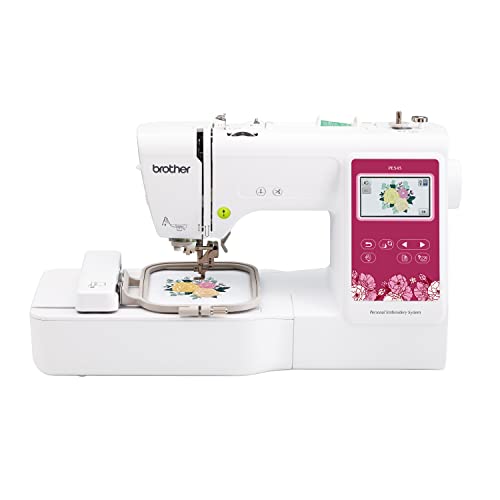
The PE545 emphasizes embroidery with a 4″ x 4″ field and a 3.7″ LCD touchscreen for straightforward pattern selection. Wireless LAN enables Design Database Transfer or USB-based transfers, and Artspira support helps users craft patterns from mobile devices. Best for crafters who want a dedicated embroidery machine with a compact footprint.
Who it’s best for: sewists who prioritize embroidery capacity and a user-friendly interface. Why selected: strong embroidery-focused features in a compact package, paired with wireless transfer options for easy pattern management.
Caution: If you primarily sew garments with intricate stitches, you might want a machine with more stitching options beyond embroidery, or plan to pair this with a separate sewing machine.
Brother SE2000 Sewing & Embroidery Machine Bundle

The SE2000 combines over 190 built-in embroidery designs with 241 sewing stitches and 13 embroidery fonts, plus wireless LAN for Design Database Transfer and Artspira app integration. It ships with multiple hoops (including 5″ x 7″ and 4″ x 4″), a broad starter design library, and portable capabilities. Best for users who want versatility in a single machine and access to a large design library.
Who it’s best for: intermediate users who want a broader stitch library and the flexibility to embroidery larger designs. Why selected: the expansive design collection and multi-hoop support make it a strong all-in-one option for growing projects.
Caution: The feature set is broad; take time to explore the software tools and tutorials to maximize the machine’s potential.
PooLin EOC03(2in1) Sewing & Embroidery Machine

This 2-in-1 machine offers a 4″ x 4″ embroidery area and an extended 4″ x 9.25″ field for larger designs. It includes 130 built-in embroidery designs and 207 sewing stitches. Best for home crafters who want both sewing and embroidery in one affordable package.
Who it’s best for: beginners and hobbyists seeking dual-functionality with two hoop sizes. Why selected: the dual-hoop approach supports a range of project sizes without a separate embroidery unit.
Caution: The setup may be less intuitive for absolute beginners; access to the training materials can help reduce the learning curve.
PooLin EOC03 Embroidery Machine 4×4 & 4×9.25

This model emphasizes beginner-friendly operation with the Institch system and a clean interface. It ships with two hoop sizes and 130 built-in designs, suitable for straightforward projects. Best for learners who appreciate clear navigation and easy-to-understand controls.
Who it’s best for: first-time embroiderers who want a simple workflow. Why selected: the Institch operating system and guided navigation help new users start stitching quickly.
Caution: While easy to use, high-volume production or highly complex designs may require more advanced machines later on.
Smartstitch S-1001 Upgraded Embroidery Machine

The S-1001 targets more serious hobbyists and light commercial use with features like auto thread trimming, auto color changing, and a robust memory capacity. It is designed for faster embroidery and more complex designs, including hats and flat items thanks to positioning features. Best for users who want performance and automation at home or in a small studio.
Who it’s best for: experienced hobbyists or small-business crafters seeking speed and automation. Why selected: advanced features support higher throughput and more complex designs than entry-level models.
Caution: For casual crafters, the learning curve and investment may be overkill; plan to maximize practice and software support before purchasing.
Buying Guide: Key Considerations For Programmable Embroidery Machines
What hoop size do you need?
Hoop size determines the maximum embroidery area. If you mainly create small motifs, a 4″ x 4″ hoop suffices. For larger designs or continuous patterns, choose machines offering 5″ x 7″ or larger hoops.
Do you prefer wireless transfer or USB only?
Wireless transfer via Design Database Transfer and apps like Artspira simplify pattern management and on-the-go design work. USB transfer is a reliable backup and works well if you work primarily from a computer.
How important is a wide built-in design library?
A larger library saves time and expands creativity. Look for machines with hundreds of built-in designs plus access to downloadable patterns and fonts.
What level of sewing features matters?
Consider stitch variety, font options, and added sewing features like automatic thread trimming or jump stitch cutting. Some machines lean heavily into embroidery, while others offer robust sewing capabilities as well.
Which accessories matter for starters?
Essential items include multiple hoops, a basic thread kit, stabilizers, and needles. Some bundles add instructional guides or video tutorials which can accelerate learning.
For future growth: is upgradeability important?
Look for machines that support larger hoops, more designs, and software compatibility to extend your options as skills grow.
FAQ
- What is the difference between a sewing and embroidery machine and a combo model? A combo model performs both sewing and embroidery in one unit, whereas separate machines specialize in one function. Combo models are convenient for space and workflow but may lack some advanced embroidery features found in dedicated embroidery-only machines.
- Are wireless transfers essential? Wireless transfers simplify moving designs from devices to the machine and enable pattern transfers via mobile apps. They are convenient but not strictly required if you’re comfortable with USB transfers.
- Can I embroider large designs with these machines? Some machines support larger embroidery fields with specific hoops (e.g., 5″ x 7″). If you plan large projects, prioritize larger hoop compatibility or consider a machine designed for bigger fields.
- Do these machines require software purchases? Many machines ship with patterns and software access; some features use companion apps or included design packs. Always verify what software and designs are bundled or downloadable.
- Is professional instruction needed? Basic models can be used with built-in guides and tutorials. More complex operations or advanced designs benefit from training resources or community support.
- Should I choose a high-end model for future-proofing? If you anticipate growing into frequent, large, or complex embroidery, a higher-end model with more memory, faster speed, and multiple needles may be worthwhile.