Best Embroidery Machine Second Hand Options for Easy, Affordable Crafting
The best embroidery machine second hand options let you start or grow a sewing and embroidery hobby or small business without paying premium prices. This guide highlights five reliable machines that balance cost, features, and potential for growth. Each pick targets different buyers—from beginners seeking simple patterns to creators needing larger embroidery fields and multi-needle reliability. Read on to compare capabilities, ideal use cases, and practical cautions so you can choose the right fit for your projects.
| Product | Best For | Key Benefit |
|---|---|---|
| Brother SE700 Series | Crafters and hobbyists | Built-in designs and wireless transfer |
| Brother SE2000 Bundle | Serious hobbyists and small studios | Large hoop options and designs |
| Brother SE700 Combo | All-in-one bundles | Complete accessories for quick setup |
| Brother Skitch | Beginners and casual users | App-driven and easy entry |
| Poolin 15-Needle EOM | Small business/hats and apparel | High color capacity and production speed |
Brother SE700 Sewing and Embroidery Machine

The Brother SE700 combines sewing and embroidery in one versatile unit. It includes wireless LAN for easy design transfers, 135 built-in embroidery designs, 103 stitches, and a 4″ x 4″ embroidery area. Best for hobbyists who want quick access to patterns and the ability to import designs via App or USB. Users should note that larger projects may require hooped layouts within the 4″ x 4″ field.
- Best for beginners who want an all-in-one machine with modern connectivity.
- Better for projects that fit inside 4″ x 4″ frames.
Brother SE2000 Sewing and Embroidery Machine Bundle

This bundle expands capabilities with a larger 5″ x 7″ field and multiple hoops, plus more built-in designs (50,000+ ready-to-stitch options) and essential accessories. It’s ideal for serious hobbyists or small studios that need flexibility for bigger designs and faster workflows. The setup includes an embroidery starter package, multiple stabilizers, and a variety of hoops to accommodate larger projects.
- Best for expanding from small designs to larger, professional-looking embroidery.
- Better for users who frequently work with multi-hoop layouts.
Brother SE700 Combo Embroidery & Sewing Machine Bundle

This combo focuses on all-in-one versatility with 4″ x 4″ embroidery and a complete accessory bundle, including four hoops and a set of embroidery threads. Best for crafters who want a ready-to-go kit with diverse hoop options and essential tools to begin a range of projects immediately. A limitation to consider is that the bundled threads and feet may not cover every specialty technique you explore later.
- Best for getting started with a full set of tools and multiple hoop sizes.
- Choose this if you want ready-to-use accessories bundled together.
Brother Skitch Single-Needle Embroidery Machine

The Skitch model emphasizes simplicity and accessibility via the Artspira app, enabling users to draw and import designs up to 4″ x 4″ with Bluetooth connectivity. Best for absolute beginners or casual hobbyists who prefer app-driven design work. A potential limitation is the smaller 4″ x 4″ field, which may constrain larger motifs or dense embroidery projects.
- Best for newcomers seeking an easy entry into embroidery with mobile design workflow.
- Avoid if you need larger embroidery fields or multi-needle capability.
Smartstitch S-1001 10-Needle Embroidery Machine

The S-1001 is a compact, multi-needle option designed for higher production. It features up to 100 million stitches memory, auto color changes, and a laser embroidery positioning system. Best for small business or serious hobbyists needing fast, multi-color designs. Limitations include a learning curve and the need for ongoing maintenance and support resources to fully leverage its capabilities.
- Best for rapid, color-rich designs and hats, caps, and apparel.
- Better for users who can manage a steeper setup and learning curve.
Brother PE545 Embroidery Machine
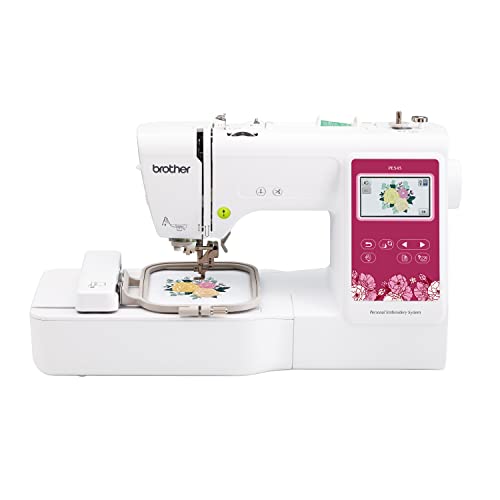
The PE545 offers wireless LAN and a 4″ x 4″ hoop with a large touchscreen, plus access to Artspira for pattern transfer. It suits buyers looking for a compact, connected machine with a straightforward embroidery workflow. A caveat is that it shares the same field size limitation as many hobbyist models, which may require multiple passes or creative design planning for larger projects.
- Best for connected embroidery with a compact footprint.
- Choose this if you value wireless pattern transfer and a user-friendly interface.
Brother PE545 Premium Embroidery Machine
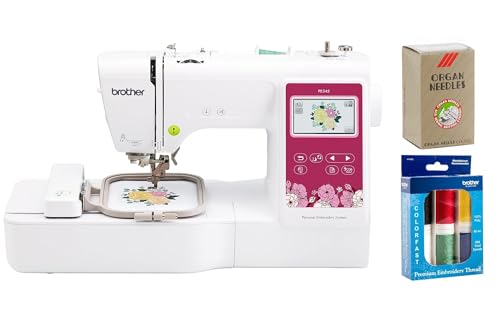
This variant emphasizes a premium embroidery experience with a wireless transfer setup and 4″ x 4″ field. Best for buyers who want a reliable, connected workflow and access to a broad range of designs through App integration. Like other 4″ x 4″ machines, it’s best for smaller motifs or combinations rather than large-scale panels.
- Best for a reliable, connected, beginner-friendly workflow.
- Avoid if you need large embroidery fields for big projects.
Poolin EOM 15-Needle Commercial Embroidery Machine

The Poolin EOM is a 15-needle commercial model designed for hats, caps, and day-to-day orders. It supports automatic color changes and WiFi/USB transfer for efficient production. Best for small businesses focusing on cap embroidery and multi-color designs. A limitation is the potential need for technical support during setup and operation, which is common with commercial-grade equipment.
- Best for cap embroidery and multi-color production.
- Choose this if you need high-color capacity and automated workflows.
Buying Guide: Key Considerations for a Second-Hand Embroidery Machine
What should you assess before buying a used embroidery machine? Focus on hoop size, needle capacity, and connectivity. Larger embroidery fields support more ambitious designs, while multi-needle machines reduce thread changes and accelerate production. Connectivity options like WiFi or Artspira compatibility enable easier pattern import and design transfer.
- Hoop size matters: 4″ x 4″ works well for small projects; 5″ x 7″ or larger expands options.
- Needle count affects color changes and production speed. Multi-needle units are higher capacity but cost more.
- Check software compatibility and available hoops; ensure ongoing support and updates are accessible.
- Consider bundled accessories: extra hoops, stabilizers, threads, and feet can save time and money.
- Ask about firmware updates and warranty status, where available, and verify the machine’s working condition with a live demo if possible.
FAQ
- Q: Is a second-hand embroidery machine reliable for beginners? A: Yes, many used machines offer dependable performance, but verify hoop options, firmware status, and basic operating functions before purchase.
- Q: What is a practical embroidery hoop size for beginners? A: start with 4″ x 4″ to learn basic techniques, then consider larger fields as skills grow.
- Q: Do I need a computer to use these machines? A: Several models support USB or wireless pattern transfer, while others rely on apps for design input.
- Q: Are multi-needle machines worth the extra cost? A: For users with frequent multi-color designs or production needs, multi-needle options can improve efficiency.
- Q: What maintenance is typical for used embroidery machines? A: Regular cleaning, lint removal, oiling as specified by the model, and checking needles and threads is advised.
- Q: Can these machines sew as well as embroider? A: Most listed models combine sewing and embroidery capabilities, but individual strengths vary by design.