Best Freeview Recorder DVD Player Picks for Retro Tapes and DVDs
Finding a reliable Freeview recorder DVD player that handles both VHS-to-DVD transfers and modern DVD playback is essential for preserving old tapes while enjoying new discs. This guide highlights five top options, explaining who each is best for and why. Ideal buyers include: collectors wanting simple VHS-to-DVD transfers, budget-conscious savers who want renewed devices, and multimedia enthusiasts seeking multi-format playback. A quick comparison table follows to help you decide at a glance.
| Product | Best For | |
|---|---|---|
| Toshiba VHS to DVD Recorder VCR Combo w/ Remote, HDMI (Renewed) | Direct VHS-to-DVD transfers at home | One-button tape-to-DVD conversion |
| Toshiba DR430 DVD Recorder (Renewed) | 1080p DVD recording with clean playback | 1080p resolution and 3:2 pulldown |
| VHS RECORDER AND DVD PLAYER (Renewed) | Simple combo for basic VHS/DVD use | VHS and DVD playback in one unit |
| Toshiba D-RW2 DVD Player/Recorder | Standalone DVD recording with basic media support | One-touch recording and slideshow capability |
| Panasonic DMR-ES35VS DVD Recorder / VCR Combo | Easy dubbing between VCR and DVD | DV input and dual-disc recording options |
Product 1: Toshiba VHS to DVD Recorder VCR Combo w/ Remote, HDMI (Renewed)
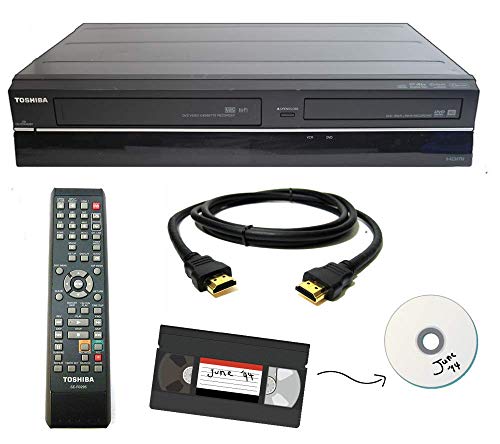
Brand: TOSHIBA. This unit is designed to transfer VHS tapes to DVD with a single press, making home transfers easy. It is best for buyers who want a straightforward, no-fuss method to preserve aging tapes without sending them to a lab. The included remote and HDMI output support convenient control and modern display quality. A key limitation is that feature emphasis centers on transfer-to-DVD; verify HDMI compatibility with newer TVs prior to use.
Best for: VHS collectors and families who want a simple, one-button transfer from tape to disc. This model prioritizes hassle-free operation and at-home preservation over advanced digital features.
Product 2: Toshiba DR430 DVD Recorder (Renewed)

Brand: TOSHIBA. This model emphasizes video quality with 1080p resolution and 3:2 pulldown, plus MP3 playback. It’s best for viewers who want a refreshed interface and clear playback of DVDs, with additional media compatibility for audio playback. Note that some owners may seek more modern streaming options, as this unit focuses on disc-based media and local playback rather than streaming apps.
Best for: Users who prioritize higher-definition DVD playback and straightforward DVD recording in a compact form factor.
Product 3: VHS RECORDER AND DVD PLAYER (Renewed)

Brand: TOSHIBA. This integrated unit provides both VHS recording and DVD playback within a single chassis, suited for buyers who want a simple all-in-one solution. The renewal ensures a tested device with renewed performance. The primary limitation is that the feature set is basic compared with more modern digital options, so plan for future media formats if needed.
Best for: Singles, households, or classrooms looking for a compact, all-in-one VHS-to-DVD setup without extra frills.
Product 4: Toshiba D-RW2 DVD Player/Recorder
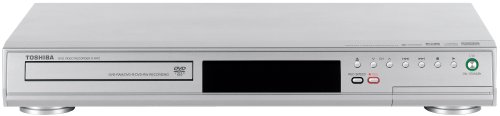
Brand: TOSHIBA. This single-disc DVD player/recorder includes a timer and one-touch recording, plus the ability to record onto DVD-R/RW and play a range of media including MP3, JPEG, and more. It also supports slide shows from stored photos. It is best for buyers who want a compact, feature-rich recorder with photo playback capabilities. A potential limitation is its older DVD-R/RW format support in some regions or newer Blu-ray expectations.
Best for: Home users who want a compact recorder with basic photo slideshow functionality and multi-format playback on a single device.
Product 5: Panasonic DMR-ES35VS DVD Recorder / VCR Combo

Brand: Panasonic. This combo unit enables easy dubbing between DVD and VCR with a dedicated DV input and supports multiple disc formats, including DVD-R/RW and DVD+R/RW. It’s best for users who frequently transfer content between VCR and DVD and want reliable dubbing with user-friendly controls. The primary caveat is that the device focuses on traditional media workflows rather than streaming or modern file sharing.
Best for: Viewers who regularly copy material between VCRs and DVDs and value simple, reliable dubbing functionality.
Buying Guide
What should you consider when choosing a Freeview recorder DVD player?
- Media formats supported: Ensure the unit records to DVD-R/RW or DVD+R/RW if you plan to archive tapes, JPEG slides, and MP3 audio.
- Video quality: Look for 1080p output or upscaling for DVDs to improve visual clarity on modern TVs.
- VHS to DVD transfer: If your primary goal is converting old tapes, prioritize models with simple, one-button transfer and reliable tape handling.
- Connectivity: HDMI output provides the best compatibility with modern TVs; composite or component outputs may be sufficient for older sets.
- Renewed vs. new: Renewed devices can save money but may have shorter remaining warranties; weigh reliability against budget.
- Ease of use: Consider remotes, on-screen menus, and one-touch recording features that reduce setup time.
- Physical footprint: Some units are compact, while others are larger consoles; measure space before purchase.
- Future-proofing: If you envision streaming or digital formats, these devices may be best used in combination with dedicated media players.
FAQ
- Can these recorders transfer VHS to DVD reliably?
Yes, several models are designed to transfer VHS tapes to DVD with a single action or straightforward controls, though results can vary with tape condition.
- Do these devices support Blu-ray discs?
No. These units focus on DVD, VHS, and older media formats; they typically do not support Blu-ray discs.
- Is HDMI output necessary for modern TVs?
HDMI is highly recommended for best picture quality and easier compatibility with current televisions.
- Are renewed products a good value?
Renewed devices can offer substantial savings and still provide solid performance, but check return policies and warranty terms.
- What formats besides DVD can they play?
Many models support MP3, JPEG, and various DVD formats; check each unit’s listed features for exact compatibility.
- Should I choose a standalone DVD recorder or an all-in-one VCR/DVD combo?
Choose based on space, immediate transfer needs, and whether you want a single device for both playback and recording tasks or dedicated functions.