Best Microwaves and Accessibility Aids for Visually Impaired Users
Finding the best microwave for visually impaired individuals involves looking beyond just functionality to accessibility features and tactile aids that enhance usability. This article explores top microwaves designed with user-friendly controls, as well as tactile bump dot stickers and large character labels that assist in operating microwaves and other appliances. Below is a summary table of highlighted products, followed by detailed reviews and an insightful buying guide to help you make the right choice.
| Product | Type | Key Features | Brand |
|---|---|---|---|
| Chefman Countertop Microwave Oven 0.7 Cu. Ft. | Microwave Oven | 700 Watts, 10 power levels, 6 presets, child safety lock | Chefman |
| BLACK+DECKER EM031MB11 Digital Microwave Oven | Microwave Oven | 1000 Watts, 10 power settings, large LED display, child lock | BLACK+DECKER |
| Bump Dots for Visually Impaired 106PC Combo Pack | Tactile Aid | Various shapes and colors, self-adhesive, tactile marking | GorillaGrit |
| BLEWAY 200 Pcs Bump Dots Combo Pack | Tactile Aid | High contrast colors, silicone, multiple shapes, flexible use | BLEWAY |
| Large Character Stickers for Microwaves | Accessibility Sticker | 104 large stickers, increases button size, detailed labels | AbleSee |
Chefman 0.7 Cu. Ft. Countertop Microwave with Safety Features

This Chefman microwave offers a compact design with 700 watts of power and multiple cooking options to suit various needs. It includes 10 power levels and six preset cooking modes, such as popcorn, pizza, and veggies, providing quick meal preparation without confusion over settings. The child safety lock and mute button enhance usability for visually impaired users aiming to avoid accidental button presses or disruptive noises.
Users can easily set cooking times by simply pressing corresponding number keys or adding 30-second increments with a dedicated button. Its digital controls are intuitive, and the inclusion of an eco mode ensures energy-efficient operation. This microwave balances ease of use and efficient cooking in a small footprint, making it suitable for kitchens prioritizing accessibility.
BLACK+DECKER 1.1 Cu. Ft. Digital Microwave Oven with Large Display

The BLACK+DECKER EM031MB11 microwave offers a generous 1.1 cubic feet capacity and robust 1000-watt power output. It features a large LED digital display and an easy-to-read control panel, aiding users with impaired vision to clearly see settings. Pre-programmed selection buttons include popcorn, potato, pizza, frozen vegetables, and beverages for convenient use without complicated inputs.
Operating the microwave is straightforward, with 10 power settings and a 30-second express cooking option. The built-in child safety lock ensures safety while the turntable promotes even heating. This model offers a balance of power and accessibility features catering to visually impaired individuals seeking efficiency.
Bump Dots for Visually Impaired 106PC Combo Pack by GorillaGrit
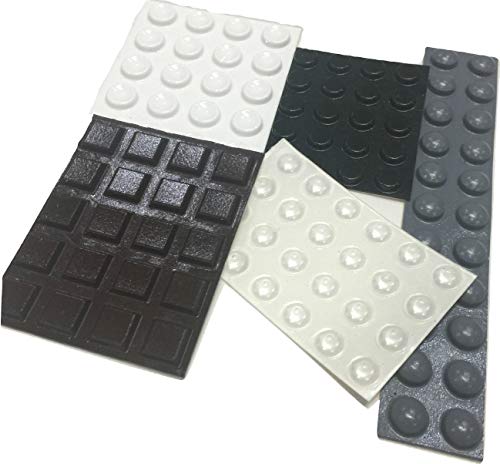
This 106-piece tactile marking set includes an assortment of colors, shapes, and sizes tailored for visually impaired users. The self-stick bump dots provide a raised tactile surface ideal for identifying buttons, switches, and appliance controls, helping to avoid mistakes when using microwaves or other devices.
Included shapes such as circles, squares, jelly buttons, and recessed markers allow personalization based on user preferences or specific appliances. The dots are made in the USA from durable materials and designed to accommodate conditions like glaucoma, macular degeneration, and blindness, improving independence and confidence during appliance operation.
BLEWAY 200 Pcs Bump Dots Combo Pack in High Contrast Colors

This large set features 200 bump dots crafted from quality silicone in five vibrant colors: purple, red, yellow, green, and blue. The diverse shapes like X, L, triangle, rectangle, and circle support creating a customizable tactile identification system fitting various appliances, including microwaves.
The high contrast colors and shapes assist those with low vision or blindness to distinguish controls more easily through touch and visual contrast. The silicone texture is soft yet durable, sticking well to smooth surfaces such as microwave panels, keyboards, and remotes for reliable long-term use.
Large Character Stickers for Microwaves by AbleSee

A simple yet effective solution to aid visually impaired users is these large character stickers designed to increase button size and visibility on microwaves. The pack includes 104 stickers offering ample options for labeling and describing various controls clearly.
They can be used individually or layered to provide detailed text and symbols, improving ease of identification and reducing operational errors. This affordable tactile aid can be paired with bump dots or used alone, enhancing microwave accessibility without permanent modifications.
Buying Guide: Choosing the Best Microwave and Accessibility Aids for Visually Impaired Users
Key Microwave Features to Consider
- Control Simplicity: Look for microwaves with large, well-spaced buttons or digital displays that are easy to read and operate without complex sequences.
- Preset Cooking Modes: Pre-programmed buttons for common foods can reduce guesswork and enhance safety for visually impaired users.
- Power Settings: Multiple power levels allow for precise cooking, from defrosting to full power, supporting diverse meal preparation.
- Audible Feedback and Mute Options: Sound cues help users know when buttons are pressed or cooking is done, but mute functions can prevent noise disturbance.
- Safety Locks: Child or safety locks prevent accidental operation or changes during use.
Tactile and Visual Aids to Enhance Usability
- Bump Dots: Raised tactile stickers help users locate and identify buttons by touch. Choose sets with varying shapes and colors depending on user preference and appliance surface.
- High Contrast Colors: Bright, contrasting colors improve button visibility for users with partial sight.
- Large Character Stickers: Enlarging numbers and symbols on controls can significantly reduce errors in button operation.
- Durability and Adhesion: Select tactile aids made of soft, durable silicone with strong adhesives that stick firmly to smooth microwave surfaces without damage.
Usage and Maintenance Tips
- Ensure tactile stickers are compatible with microwave surfaces (metal, plastic, glass) and reposition them carefully without damaging buttons.
- Clean microwaves regularly to avoid dirt buildup around tactile labels.
- Combine auditory cues with tactile aids to maximize safe navigation and operation.
- Customize the tactile system uniquely for each microwave to create a personal, easy-to-understand pattern.