Best Microwave Stickers for Visually Impaired: Tactile Dots for Easy Use
Direct answer: Tactile bump dots and silicone sticker sets designed for microwaves help visually impaired users locate keys, dials, and controls by touch. This article highlights five practical options best suited for seniors, blind or low-vision individuals, and visually impaired caregivers who want clear, durable labeling on microwave controls and other appliances. Each product is evaluated for surface compatibility, tactile clarity, and ease of application. The following picks aim to improve independence, reduce errors, and simplify daily kitchen tasks.
| Product | Best For | Key Benefit |
|---|---|---|
| Cosprint Bump Dots Combo Pack | General low-vision users | Large color variety and shapes for broad identification |
| BLEWAY 165 Pcs | Surface versatility | Multiple shapes and high-contrast colors |
| BLEWAY Tactile Icon Stickers | Appliance-specific labeling | Designed for microwaves, ovens, and more |
| BLEWAY 200 Pcs Combo Pack | Customizable system | Five colors, multiple shapes |
| 25 Premium Tactile Stickers | Kitchen and laundry labeling | 2.5D icons with heat resistance |
Cosprint Bump Dots Combo Pack
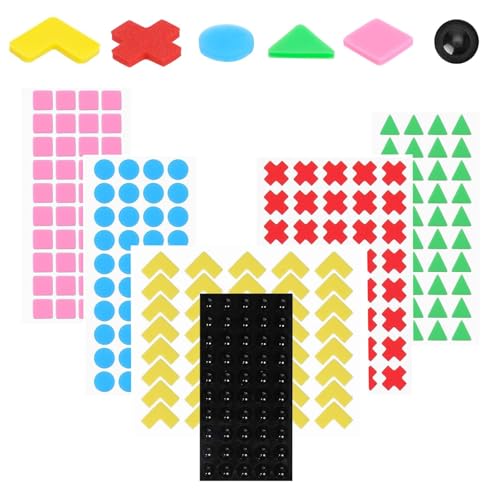
Best for: Users who want a versatile kit with many colors and shapes for widespread device labeling. The 250-piece set covers multiple surfaces from microwaves to remote controls, enabling quick touch-based identification. The kit includes two shapes (circles and squares) across six colors, supporting a broad, color-coded system that reduces confusion in busy kitchens.
Why it’s selected: The large quantity and varied shapes support a tailor-made labeling approach. Durable silicone offers gentle tactile feedback, and the color variety helps users remember which color corresponds to specific functions.
Limitation: Adhesion is optimized for smooth surfaces; rough textures may reduce stickiness. Use on metal, glass, plastic, and similar smooth surfaces for best results.
BLEWAY 165 Pcs Combo Pack

Best for: Builders of a tailored tactile system across multiple devices, especially on kitchen controls and small appliances. The three shapes (hemisphere, cylinder, square) plus 0.2–0.4 inch sizing provide options for subtle or pronounced cues.
Why it’s selected: High-contrast color options paired with diverse shapes improve quick recognition by touch and sight. The kit supports a personalized approach to labeling, which is helpful for households with varying device layouts.
Caution: Surfaces must be smooth to maximize adhesion; rough or textured surfaces may cause loose application over time.
BLEWAY Bump Dots 200 Pcs Combo Pack

Best for: Users who need a robust color-and-shape system to label multiple household devices, including kitchen appliances and electronics. This pack offers purple, red, yellow, green, and blue dots with distinct shapes to minimize cross-label confusion.
Why it’s selected: The five-color palette and shape variety enable a flexible approach to mapping functions, such as power, mode, and timer on microwaves and other controls.
Limitation: Look for surfaces with good adhesion; if the surface is too textured or dirty, the dots may not adhere well.
25 Premium Tactile Stickers From STACTILES

Best for: Kitchen and laundry labeling where durable, heat-resistant icons are necessary. The 2.5D raised icons include water drops, thermometer, and power symbols for quick, tactile recognition on appliances.
Why it’s selected: The 25 icons are purpose-built for common appliance functions, making it straightforward to identify dials and buttons by touch alone. They are designed to withstand typical kitchen conditions, reducing wear over time.
Limitation: Icons may be more visually focused, so ensure tactile height is clearly distinct from surrounding surface textures to avoid misidentification.
Buying Guide
What to consider when choosing microwave-related tactile stickers
- Surface compatibility: Most tactile dots adhere best on smooth metal, glass, plastic, and polished surfaces. Avoid rough or dusty surfaces for optimal adhesion.
- Shape and color variety: Select packages with multiple shapes and colors to differentiate functions (power, time, start, numeric keys) quickly by touch and sight.
- Material and texture: Silicone-based dots provide gentle tactile feedback and skin-safe surfaces. Consider non-slip textures for high-use areas.
- Size and placement: Smaller dots are suitable for compact dials; larger dots can be clearer on big buttons or switches. Plan placement to minimize interference with labels or safety warnings.
- Durability and heat resistance: For appliances in kitchens, choose heat-resistant stickers that endure frequent contact and steam exposure.
- Adhesive type: Self-adhesive backing works well on smooth surfaces; if you’re labeling multiple surfaces, a removable adhesive may be preferred to avoid residue.
Practical comparison tips
- Best for broad coverage: Cosprint 250 PCS offers many colors and shapes for wide labeling across devices.
- Best for appliance-specific labeling: BLEWAY Tactile Icon Stickers are designed with microwaves and other appliances in mind.
- Best for customizable labeling: BLEWAY 165 Pcs and BLEWAY 200 Pcs combos allow building a personalized system with varied colors and shapes.
- Best value for kitchen-laundry use: STACTILES 25 icons deliver purpose-built symbols with durable performance.
FAQ
- Q: Are these tactile stickers safe for sensitive skin? A: Yes, most are made from soft silicone and provide gentle tactile feedback without irritation.
- Q: Can I remove them without residue? A: Some sets use removable adhesives; check product details for residue-free options.
- Q: Will these stickers damage microwave surfaces? A: They are designed for smooth surfaces and should not damage finishes if removed carefully.
- Q: How many colors should I use for labeling? A: Use a color for each function (e.g., red for power, blue for timer) to reduce confusion during operation.
- Q: Do these work on digital microwave panels or always-on controls? A: They work best on textured but smooth surfaces; verify the surface before applying.