Best Kitchen Island Pop Up Outlets for a Clean, Accessible Surface
Looking for the best outlet solutions to put on a kitchen island or countertop? This guide highlights five top pop‑up and recessed outlets, chosen for versatility, safety, and ease of installation. Each option fits a standard island or desk hole and offers USB charging, surge protection, or wireless charging. Ideal for homeowners upgrading a kitchen workspace or office with a built‑in style, space‑saving power solution.
| Product | Best For | Key Feature |
|---|---|---|
| 2.5 Inch Hole Pop Up Outlet for Countertop | Granite or quartz counters needing quick pop‑up access | 4 AC outlets, 2 USB‑C, 2 USB‑A, TR safety |
| ANNQUAN 3.15″ Pop Up Countertop Outlet | Higher charging needs with wireless charging | Wireless 15W charger, 4 AC outlets, 2 USB‑C, 2 USB‑A |
| SURAIELEC GFCI Pop Up Outlet | Counters near water or splashes | 4 GFCI outlets plus USB ports |
| HHSOET 5 in 1 Recessed Power Strip | Under‑desk or furniture with flat plug needs | 2 AC plugs, 2 USB ports, USB‑C, flat plug |
| Pop Up Outlet with Wireless Charger (HEZI) | All‑in‑one wireless charging and USB ports | 8 outlets, 2 USB‑C, 2 USB‑A, 15W wireless |
2.5 Inch Hole Pop Up Outlet for Countertop

This unit fits a standard 2.5‑inch hole and delivers four AC outlets plus two USB ports and two USB‑A ports. It uses a tamper‑resistant receptacle to meet code and reduce child risk. It is best for kitchens or conference spaces where a flush, discreet pop‑up is desired and where multiple devices may be charged at once.
Best for: countertop users who want a compact yet versatile pop‑up with mixed charging options. It’s particularly suitable for granite or quartz surfaces where the unit hides neatly when retracted.
Caution: Installation requires a precise 2.5‑inch opening; if your hole is larger or smaller, sealing may be needed to prevent wobble. Data mentions “charge up to 8 devices” across the two USB ports and four AC outlets, which helps with high daily device use.
ANNQUAN 3.15″ Pop Up Countertop Outlet

This option requires a 3.15 inch (80 mm) hole and offers a wireless charger along with four outlets and two USB ports. It supports up to 20W Power Delivery for fast charging and includes a safety reminder to cycle the mechanism more than five times before first use to activate the spring. The wireless charger adds convenience for mobile devices while the outlets cover typical kitchen appliances and gadgets.
Best for: users who want both wired outlets and wireless charging in a single, compact pop‑up. It’s especially helpful where desk or island surfaces benefit from a central charging hub.
Caution: Wireless charging is centered on the top panel; coverage may be limited if the device isn’t placed precisely in the middle. The assembly note emphasizes multiple activations to ensure smooth operation.
SURAIELEC GFCI Pop Up Outlet

This unit features four GFCI outlets and two USB ports in a 4.3″ hole, designed for splash‑resistant or splash‑prone environments on counters or desks. GFCI outlets offer enhanced protection against leaks and shocks, making it a strong candidate for kitchens and offices with water exposure. It’s ETL listed and includes a compact lower section that rises to over 3.84 inches above the surface during use.
Best for: spaces with occasional moisture risk where GFCI protection adds peace of mind. The multiple outlets plus USB options support a range of devices in a single pop‑up unit.
Caution: The installation note mentions a protective film on the top that should be peeled off before use, which is easy to overlook during setup. Ensure proper hole clearance and ring tightening for a locked fit.
HHSOET 5 in 1 Recessed Power Strip

This flat‑plug, recessed power strip is designed for furniture and desk installations. It includes two AC plugs plus a 2‑port USB setup (USB‑A and USB‑C) and a 6 ft power cord. The flat plug helps conserve rear clearance and keeps the surface tidy, while the 20W charging output supports fast charging for compatible devices.
Best for: desks or island surfaces where under‑table or flat‑profile installations are preferred to minimize side clearance issues.
Caution: While the flat design saves space, ensure the cutout and mounting are precise; rough cuts can create gaps around the edges. It’s a compact option but with a limited number of outlets compared to larger pop‑ups.
Pop Up Outlet With Wireless Charger (HEZI)
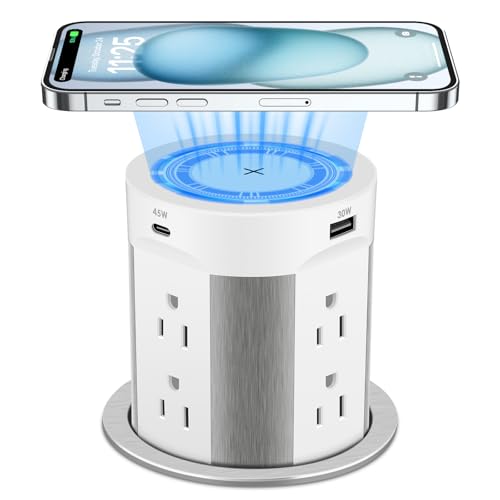
Combining pop‑up power with wireless charging, this HEZI unit offers 8 outlets, including 2 USB‑C and 2 USB‑A ports, and 15W wireless charging. With 15A AC outlets and a total maximum output that includes PD and QC fast charging, it aims to minimize clutter and maximize device readiness. The 4‑inch island installation size makes it adaptable for mid‑size countertop islands.
Best for: households seeking a comprehensive, all‑in‑one power solution that reduces cables while supporting wireless charging for mobile devices and wearables.
Caution: Wireless charging performance depends on precise device placement; center alignment improves charging efficiency. Watch for heat with heavy multitasking on the USB‑C and USB‑A ports.
Buying Guide
What should you consider when choosing a kitchen island outlet?
- Hole size compatibility: Most units fit 2.5″–3.15″ openings. Measure your island hole before purchase to avoid gaps or installation issues.
- Power needs: Count devices you plan to plug in at once. If you have many gadgets, look for multiple AC outlets plus USB ports (and consider USB‑C for PD charging).
- Safety features: Tamper‑resistant outlets and GFCI protection are important in kitchens and near water sources. ETL or UL listings add reliability.
- Wireless charging: If you want cordless convenience, prioritize units with a central wireless pad and ensure the device alignment is practical for daily use.
- Flush vs. pop‑up: Pop‑up designs save surface space, while recessed or flat‑plug models suit tight under‑counter areas or desk installations.
- Installation notes: Some units require cycling the pop‑up mechanism multiple times during setup. Ensure you follow the manufacturer’s activation steps to avoid malfunction.
Frequently Asked Questions
- What is a pop‑up outlet and why is it useful on an island?
It provides hidden power access that stays flush when not in use, reducing clutter on a busy work surface. - Can I install these outlets in countertops myself?
Yes, most models are designed for do‑it‑yourself installation with a hole saw and mounting ring; follow the included instructions. - Are USB ports necessary on a kitchen island?
USB ports help charge devices without occupying a wall outlet, which is convenient for phones, tablets, and small appliances. - Which safety features should I prioritize?
Tamper‑resistant outlets, GFCI protection for wet areas, and proper local approvals (ETL/UL) ensure safer operation in kitchens and offices. - Do wireless chargers on pop‑ups affect performance?
Wireless charging works best when devices are placed centrally on the pad; performance may vary with device case materials or alignment. - What’s the advantage of a flat plug on recessed outlets?
A flat plug reduces rear clearance needs, letting the unit sit closer to walls and preventing protruding cords behind furniture.