Best Pop Up Outlets for Kitchen Islands and Countertop Power Needs
Looking for a sleek, hidden power solution for a kitchen island or counter? These pop up outlets provide convenient charging and outlets without clutter. This guide focuses on five well-suited options for kitchens, home offices, and conference spaces. Each product is evaluated for installation ease, charging capacity, and practical use cases so you can choose the right fit for your space and needs.
| Product | Best For | Key Benefit |
|---|---|---|
| ANNQUAN 3.15″ Pop Up Outlet With Wireless Charger | Homes and small offices | Integrated 15W wireless charging with 4 outlets and USB ports |
| ANNQUAN 3.15″ Pop Up Countertop Outlet | Multi-device charging | 4 outlets + 4 USB ports with wireless charging |
| ANNQUAN Motorized Pop Up Countertop Receptacle | Modern, tech-forward spaces | Motorized lift with touch control and wireless charging |
| Jgstkcity Pop Up Power Outlet | Budget-conscious remodels | 2 USB ports, 4 USB-C/USB-A options, heavy use |
| HEZI Pop Up Outlet with Wireless And PD | High power needs | 8 outlets plus 15W wireless and 45W PD charging |
ANNQUAN 3.15″ Pop Up Outlet With Wireless Charger

This pop up outlet is designed for quick, tool-free installation. It requires a 3.15″ hole and a simple ring removal to insert the unit. It includes a wireless charging panel and a total of four AC outlets plus USB ports. Best for kitchens or offices with moderate device counts. Choose this if you want a compact, all-in-one charging hub that blends into countertops. Caution: ensure the center panel is fully seated for the wireless charger to function reliably.
ANNQUAN 3.15″ Pop Up Countertop Outlet With Wireless Charger

Designed for busy spaces, this model also fits a 3.15″ hole and offers 4 outlets with 4 USB ports plus a wireless charging panel. It supports up to 9 devices charging simultaneously. Best for homes or small offices needing robust charging options. Better for users who want both wired and wireless charging in a flush-mounted unit. Limitation: some users may need to pop the unit multiple times to activate the mechanism initially.
ANNQUAN Motorized Pop Up Countertop Receptacle
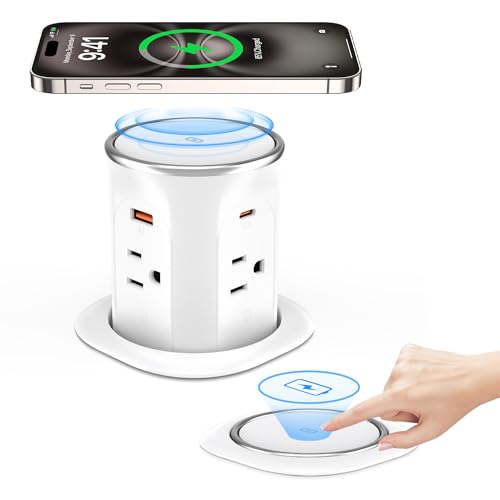
This model uses a built-in intelligent lifting mechanism with a touch-based control. It rises automatically on demand and can stay hidden when not in use. It includes a wireless charger and multiple outlets, making it ideal for modern kitchens and high-tech workspaces. Best for homes or offices prioritizing a motorized, touch-activated solution. Limitation: motorized units may require periodic maintenance for smooth operation.
Jgstkcity Pop Up Power Outlet

The Jgstkcity unit fits a 2.5-inch hole and offers a straightforward installation. It features 4 AC outlets, 2 USB-C ports, and 2 USB-A ports. Best for budget-minded remodels where a recessed, tamper-resistant outlet is needed. Choose this if you want a simple, reliable pop-up with solid charging variety. Limitation: the compact hole size may limit some larger plug shapes.
HEZI Pop Up Outlet With Wireless Charger and PD
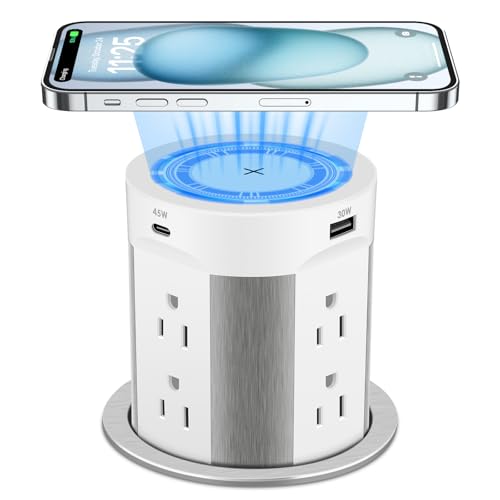
This model emphasizes high power delivery with 15W wireless charging plus 45W PD on the USB-C/USB-A ports. It includes 8 outlets total and multiple USB ports for higher device counts. Best for kitchens and islands where fast charging and multiple devices are common. Choose this if PD power and wireless charging are top priorities. Limitation: PD performance may vary with non-standard devices.
Buying Guide: Pop Up Outlets For Islands And Counters
- Installation type: Determine whether you want a manual lift, motorized lift, or a flat-to-retractable mechanism. Motorized options add convenience but may require more maintenance.
- Power and charging: Compare total outlets, USB ports, and wireless charging capacity. If you have many devices, prioritize models with multiple USB-C ports and high wireless wattage.
- PD and compatibility: If you rely on USB-C Power Delivery devices, ensure the unit supports the required watts (e.g., 20V PD) and that it provides stable delivery across devices.
- Security and safety: Look for tamper-resistant outlets, splash or weather resistance for countertops near sinks, and ETL or UL listings for safety compliance.
- Space and hole size: Measure your countertop hole to match the unit’s cutout. Some models require 2.5″ or 3.15″ holes; ensure the surrounding counter can accommodate flush installation.
- Centering and use: Wireless charging works best when devices are placed in the center of the panel. Some designs require direct center contact for optimal charging.
- Maintenance: Consider ease of access for cleaning and potential component wear in motorized units. Budget for occasional service if needed.
Frequently Asked Questions
- What is a pop up outlet and where should I use it?
A pop up outlet retracts into the counter, providing power when raised and staying flush when lowered. It’s ideal for kitchen islands, desks, or conference tables where countertop space matters and a clean look is preferred.
- Do pop up outlets support wireless charging?
Many models include a wireless charging panel. Check the wattage and ensure your devices are compatible with a 15W or similar rating for best performance.
- Are pop up outlets safe around water?
Look for splash or weather resistance ratings and tamper-resistant outlets. ETL or UL listings indicate compliance with safety standards in damp environments.
- What installation tools are required?
Most options require only a hole saw and basic hand tools. Some may need a professional if the countertop material is challenging or if wiring must be concealed.
- What should I consider for high-device usage?
Prioritize models with multiple USB ports, USB-C, and high-watt PD support so all devices can charge simultaneously without bottlenecking.
- Can these outlets be powered by existing wall outlets?
Yes, most designs connect to your standard electrical circuit. Confirm wiring requirements and local code compliance when planning a remodel.